
Want to know what people are searching for right now? Google Trends is your crystal ball into search behavior, trending topics, and keyword opportunities, and the best part? It’s completely free.
Whether you’re an SEO professional, content marketer, or business owner, understanding how to use Google Trends can transform your digital strategy. From discovering rising keywords to timing your content perfectly, this powerful tool provides insights that most marketers overlook.
In this comprehensive guide, we’ll walk you through everything you need to know about Google Trends, from basic navigation to advanced strategies that drive real results. By the end, you’ll be able to leverage search trend data like a seasoned pro.
What is Google Trends?
Google Trends is a free analytics tool that shows the popularity of search queries over time. Unlike traditional keyword research tools that provide search volumes, Google Trends reveals relative interest in topics, helping you understand:
- How search interest changes over time
- Geographic variations in search popularity
- Related topics and queries gaining traction
- Seasonal patterns in search behavior
- Comparative popularity between different keywords
Think of it as your direct line to understanding what the world is curious about right now, and what they might be interested in tomorrow.
Why Google Trends Matters for Digital Marketing
In today’s fast-paced digital world, timing is everything. Publishing content about a trending topic after it peaks means missing the opportunity. Google Trends helps you:
- Identify opportunities before competitors: Spot rising trends early when competition is still low and capitalize before markets become saturated.
- Validate content ideas: Check whether topics have sustained interest or are just temporary fads before investing time and resources.
- Plan seasonal campaigns: Understand when interest naturally peaks for your products or services, allowing you to prepare campaigns in advance.
- Understand audience geography: Discover where your target audience is actually searching, enabling smarter local SEO and regional targeting decisions.
How Does Google Trends Work?
Google Trends analyzes a sample of Google searches to compute how many searches have been done for specific terms relative to total searches over time. Here’s what makes it unique:
The Normalization Process
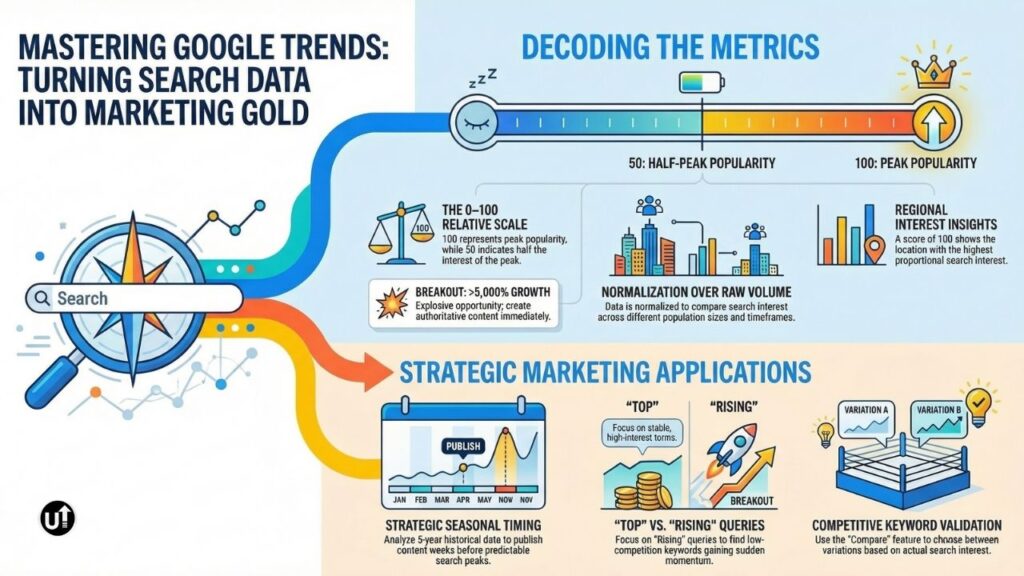
Google Trends doesn’t show raw search numbers. Instead, it normalizes data on a scale from 0 to 100, where:
- 100 = Peak popularity for the term during the specified timeframe
- 50 = Half as popular as the peak
- 0 = Not enough data or extremely low interest
This normalization allows fair comparison between different-sized populations and time periods.
Data Sampling and Privacy
To protect user privacy while providing valuable insights, Google Trends:
- Analyzes an unbiased sample of Google search data
- Anonymizes searches by removing personally identifiable information
- Filters out duplicate searches from the same user over short periods
- Categorizes searches by topic to group related queries
Timeframe Flexibility
You can analyze trends across different periods:
- Real-time: Last hour to last 7 days (with hourly or daily granularity)
- Recent history: Past 12 months to 5 years (daily or weekly data)
- Long-term trends: 2004 to present (monthly data for historical analysis)
Understanding Google Trends Numbers: What Do They Really Mean?
The numbers in Google Trends often confuse beginners. Let’s break down what you’re actually seeing.
Interest Over Time
The line graph shows search interest relative to the highest point on the chart for the given timeframe and location. A value of 100 doesn’t mean there were exactly 100 searches; it represents peak relative interest.
Example: If “vegan recipes” shows 100 in January and 50 in July, it means July had half the search interest compared to January’s peak, not that there were 100 or 50 actual searches.
Regional Interest
Geographic data shows which locations have the highest proportion of searches for your term. A score of 100 indicates the location with the highest search interest relative to total searches in that area.
Key insight: A region showing 100 doesn’t necessarily have more total searches; just higher proportional interest compared to other topics searched there.
Related Topics vs. Related Queries
Related Topics: Broad subjects associated with your search term (scored from 0-100 or marked as “Breakout” for explosive growth)
Related Queries: Specific search phrases people are using (with growth percentages or “Breakout” status)
Both provide goldmines for content expansion and keyword discovery.
How to Use Google Trends for Keyword Research
Keyword research is where Google Trends truly shines. Here’s how to extract maximum value:
1. Discover Trending Keywords Before They Peak
Navigate to Google Trends and search for a broad topic in your niche. Look at “Rising” queries in the related searches section; these represent keywords gaining momentum.
Actionable strategy: Create content around rising keywords while competition is still low. By the time they peak, your content will already have authority and ranking potential.
2. Compare Keyword Variations
Use the “Compare” feature to pit different keyword variations against each other. This helps you choose which terms to target based on actual search interest.
Example: Compare “content marketing strategy” vs. “content marketing tips” vs. “content marketing guide” to see which variation gets more searches in your target market.
3. Validate Long-Tail Keyword Opportunities
Scroll to “Related queries” and filter by “Rising” to discover long-tail variations that are gaining traction. These often have lower competition and higher conversion potential.
Pro tip: Export the related queries data to a spreadsheet for deeper analysis and prioritization based on your content goals.
4. Identify Seasonal Keyword Patterns
Set your timeframe to “Past 5 years” to reveal seasonal patterns. This helps you plan content calendars around predictable surges in interest.
Application: If “tax software” peaks every January-April, publish comprehensive guides in December to capture early-bird traffic and establish authority before the rush.
How to Read Google Trends Data Like a Pro
Raw data only becomes valuable when you know how to interpret it. Here’s your advanced guide:
Analyzing Interest Over Time Graphs
Steady upward trend: Indicates growing long-term interest, excellent for evergreen content investment
Spiky patterns: Suggest seasonal or event-driven interest, perfect for timely campaigns
Declining trend: Warns you away from dying topics before you waste resources
Flat line: Shows stable, consistent interest, ideal for steady content production
Geographic Insights for Localization
The regional interest map reveals where your audience concentration lives. Use this data to:
- Create location-specific content variants
- Target paid advertising to high-interest regions
- Understand cultural differences in search language
- Identify underserved markets with growing interest
Decoding Related Topics and Queries
Top vs. Rising distinction:
- Top: Most popular overall—safe bets with established search volume
- Rising: Fastest-growing—potential gold mines with less competition
Breakout status: Indicates explosive growth (often over 5000%), jump on these immediately for maximum opportunity.
How to Use Google Trends for SEO Strategy
Beyond keyword research, Google Trends powers comprehensive SEO strategies:
1. Timing Your Content Publishing
Understanding search patterns allows strategic content timing:
Strategy: If “summer fashion trends” begins rising in March, publish your content in February. You’ll capture early searches and build authority before peak competition arrives.
2. Optimizing for Local SEO
Filter Google Trends by specific regions to understand local search behavior. This reveals:
- Regional terminology variations (e.g., “soda” vs. “pop” vs. “coke”)
- Location-specific seasonal patterns
- Emerging local market opportunities
- Geographic content gaps your competitors haven’t addressed
3. Tracking Brand Performance
Enter your brand name and compare it against competitors. Monitor:
- Brand awareness growth or decline
- Impact of marketing campaigns on search interest
- Competitor momentum shifts
- Crisis detection through sudden interest spikes
4. Content Gap Analysis
Search for industry topics and examine related queries. Questions appearing in rising queries represent content gaps, topics people want information about but aren’t finding sufficient answers.
Implementation: Create comprehensive, authoritative content targeting these underserved queries before competition increases.
5. Seasonal SEO Planning
Use 5-year historical data to map out your entire annual content calendar. Identify:
- When to publish seasonal content for maximum impact
- Which months require more content investment
- Recurring opportunities you can prepare for in advance
- Off-season periods to focus on evergreen content
Advanced Google Trends Techniques
Take your Trends mastery to the next level with these expert strategies:
Using Category Filters
Narrow searches to specific categories (e.g., Business, Health, Technology) to filter out irrelevant data and get more accurate industry-specific insights.
Web Search vs. YouTube Search
Switch between “Web Search” and “YouTube Search” to uncover different content opportunities:
Web Search: Traditional blog posts, articles, and website content
YouTube Search: Video content opportunities—often less competitive with high engagement potential
Exploring “Breakout” Searches
When a query shows “Breakout” instead of a percentage, it means interest increased by more than 5000%. These represent explosive opportunities worth immediate investigation.
Combining Google Trends with Other Tools
Layer Google Trends data with:
- Google Keyword Planner: For actual search volumes
- Ahrefs or SEMrush: For competition analysis
- Answer The Public: For question-based queries
- Google Search Console: To track your existing performance
This combination provides both trend direction and quantifiable metrics.
Common Google Trends Mistakes to Avoid
Even experienced marketers make these errors:
Mistake 1: Treating Numbers as Absolute Search Volumes Google Trends shows relative interest, not exact search numbers. Always use complementary tools for volume data.
Mistake 2: Ignoring Geographic Variations A term trending nationally might have zero interest in your target market. Always filter by relevant locations.
Mistake 3: Chasing Every Spike Not all spikes represent sustainable opportunities. Distinguish between genuine trends and temporary news events.
Mistake 4: Using Too-Broad Timeframes Analyzing 5-year data for rapidly changing industries misses current shifts. Match your timeframe to your industry’s pace.
Mistake 5: Overlooking Related Queries The gold often lies in related searches, not your original query. Spend time exploring these connections.
Practical Google Trends Use Cases
For E-commerce Businesses
- Identify product categories gaining traction
- Time inventory purchases based on seasonal demand
- Discover product description keywords customers actually use
- Monitor competitor brand interest
For Content Creators
- Find trending topics before saturation
- Identify content angles with rising interest
- Plan publishing schedules around search patterns
- Discover related subtopics for content expansion
For Local Businesses
- Understand regional search language preferences
- Identify service demand patterns in your area
- Discover underserved local markets
- Plan local advertising campaigns with data backing
For B2B Marketers
- Track industry terminology evolution
- Identify emerging business challenges
- Monitor thought leadership topic interest
- Validate whitepaper and webinar topics
Conclusion
Google Trends is more than a free tool; it’s a strategic advantage waiting to be leveraged. By understanding search patterns, identifying opportunities early, and timing your content perfectly, you can outmaneuver competitors who rely solely on traditional keyword research.
The key to success with Google Trends lies in consistency. Make it part of your regular research routine rather than a one-time check. Track your industry keywords weekly, monitor competitor brands monthly, and revisit seasonal patterns quarterly.
Remember, the data is only as valuable as the actions you take based on it. Start with one area, perhaps keyword validation or seasonal planning, master it, then expand your usage.
Ready to transform search trends into SEO success? Open Google Trends right now and search for your primary keyword. What patterns do you see? What opportunities are waiting?
Frequently Asked Questions
Q: How accurate is Google Trends data?
A: Google Trends data is highly reliable for relative comparisons and trend identification. However, it shows proportional interest rather than exact search volumes. For absolute accuracy in numbers, combine Trends with tools like Google Keyword Planner or paid SEO platforms.
Q: Can I use Google Trends for PPC campaigns?
A: Absolutely! Google Trends helps identify seasonal bidding opportunities, discover rising keywords with lower competition, validate ad copy messaging, and understand geographic targeting opportunities. It’s particularly valuable for budget allocation timing.
Q: What’s the difference between “rising” and “top” queries?
A: “Top” queries are the most searched terms overall related to your topic—these represent established, high-volume searches. “Rising” queries have experienced the highest growth in search frequency, often indicating emerging opportunities with less competition.
Q: How often does Google Trends update?
A: Google Trends updates in near real-time for recent searches (past 7 days show hourly updates). Historical data (90 days+) updates less frequently but remains current enough for strategic planning purposes.
Q: Can I track multiple keywords simultaneously?
A: Yes! Use the “Compare” feature to track up to 5 search terms at once. This allows direct comparison of relative interest, which is invaluable for keyword selection and strategy prioritization.
Q: Does Google Trends work for YouTube SEO?
A: Definitely! Switch the search type from “Web Search” to “YouTube Search” to discover trending video topics, validate video ideas, identify seasonal video opportunities, and understand what your audience wants to watch.
Q: How far back does Google Trends data go?
A: Google Trends data extends back to 2004, providing nearly two decades of search behavior insights. This historical depth helps identify long-term patterns and validate whether current trends are cyclical or genuinely new.
Q: Can I download Google Trends data?
A: Yes! Click the download icon (top right) to export data as CSV files. This enables deeper analysis in spreadsheets, integration with other tools, and custom data visualization.
Get in touch with the United Impacts Team to discuss your content requirements.
No responses yet